
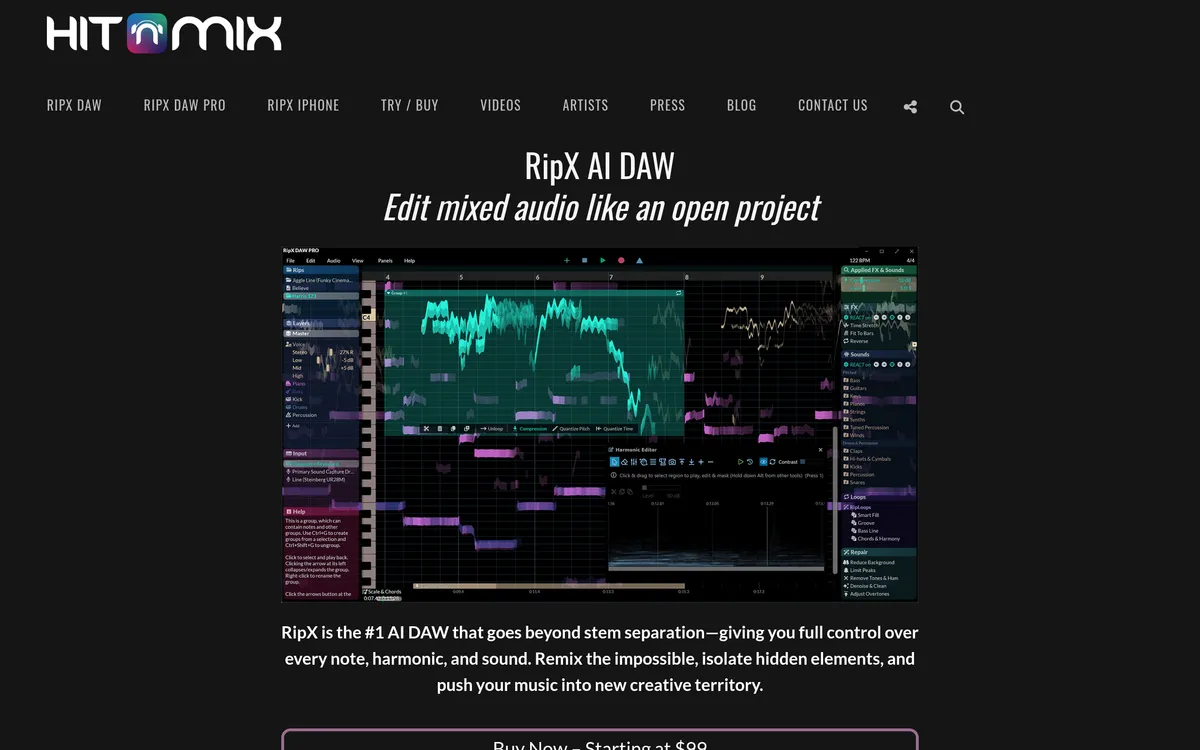
RipX AI DAW
AI-powered audio editor with per-note editing
What is RipX AI DAW?
RipX AI DAW is an audio editing environment that applies AI and machine learning to break mixed stereo files into editable musical elements. It extracts note-level information so that individual notes and harmonics can be manipulated similarly to MIDI.
The application separates a stereo source into instrument-based layers such as vocals, bass, drums and other parts, which can be isolated, soloed or exported. This workflow is useful for remixing, practice, and source analysis where original stems are not available.
Within each extracted layer you can select notes or groups of notes and alter pitch, timing, and other parameters; stems and parts can be exported as audio or MIDI for use in other tools. Those per-note edits and time/pitch controls support creative rearrangement and sampling workflows.
A Pro edition adds a set of repair and Audioshop tools for cleaning noise, harmonic editing and targeted repair, and the software can be integrated with other DAWs via plugin/connection options. A free trial is offered and paid purchase options are available for the product.
RipX AI DAW Features
Note-level extraction and MIDI-like editing
RipX converts mixed audio into a format where individual notes and harmonics are exposed and editable. That lets users treat audio content like MIDI for detailed pitch and harmonic edits across a track.
Instrument-layer (stem) separation
The app separates a stereo file into multiple instrument-based layers, letting you isolate voices, drums, bass and other parts for remixing or study. Users can choose which stems to extract and then mute, solo or export those results.
Per-note control: pitch, timing and export
Any selected note or group of notes can be edited for pitch, timing and effects, enabling tasks like harmony creation and pitch quantising. Extracted material can be saved as audio stems or exported as MIDI for further production work in other software.
Repair and Audioshop tools (Pro)
The Pro edition includes specialised repair, cleaning and harmonic-editing tools to refine separated material and remove unwanted artefacts. These tools operate on pitched and unpitched components, with controls to filter background noise, remove tones/hum and smooth amplitude variations.
DAW integration and workflow connectivity
RipX Pro provides multiple ways to connect with conventional DAWs, enabling it to act as an external editor or to link via common plugin formats. That makes it feasible to move material between RipX and a host DAW while retaining advanced editing benefits.
Pricing
Paid
User reviews
No reviews yet. Be the first to review this tool.
Log in to write a review.