
The Best Pixel Art Techniques for Beginners
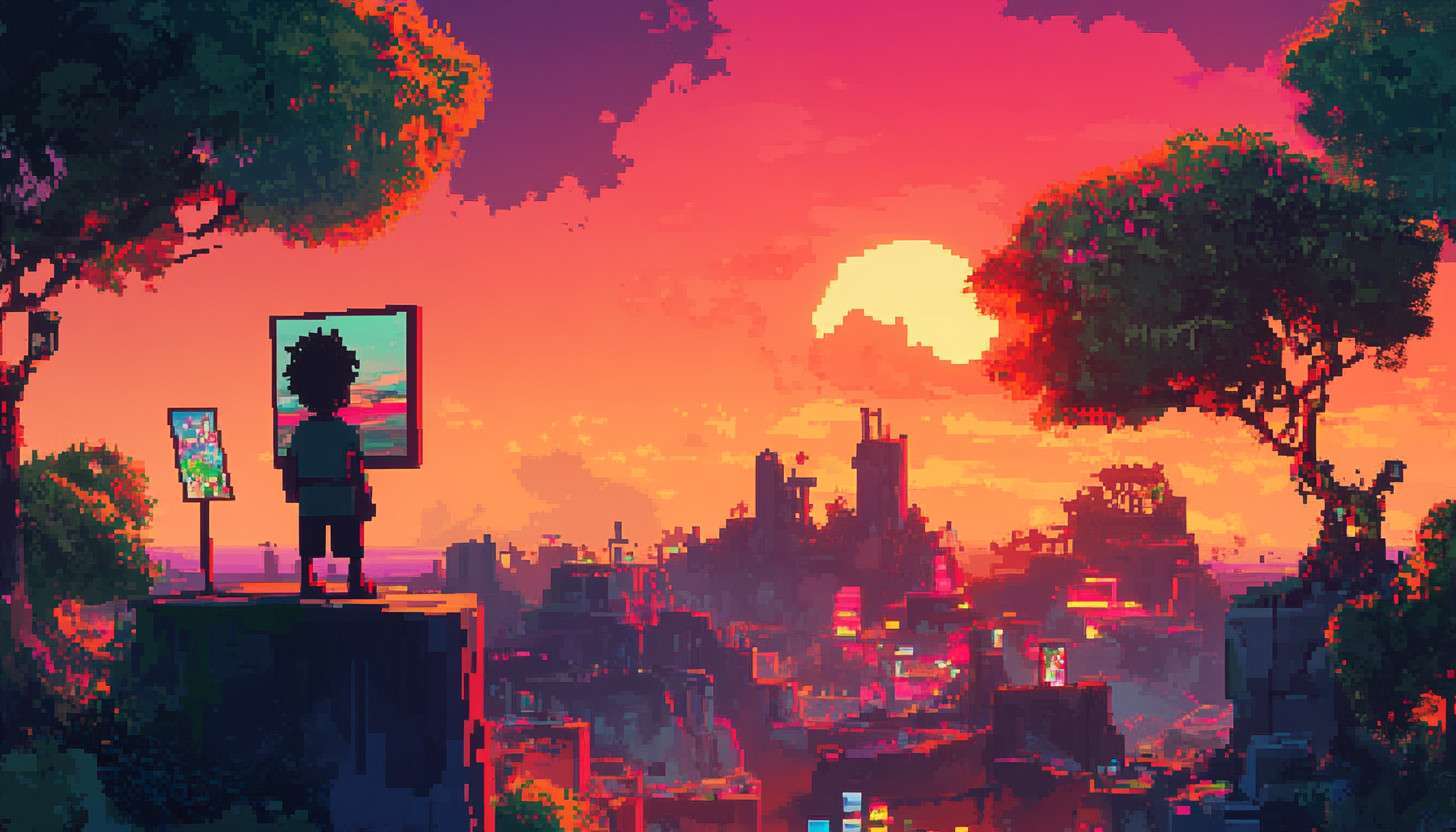
Pixel art is a unique form of digital art that uses small squares, or pixels, to create images. Its significance lies in its ability to evoke nostalgia while also serving as a foundational skill for game development and digital design. With the rise of AI’s creative revolution, artists now have access to new tools that can assist in refining their craft.
Mastering pixel art techniques is essential for artists at every level. Whether you are a beginner looking to grasp pixel art basics or an intermediate artist aiming to explore advanced pixel art methods, this guide will provide valuable insights and practical advice.
Additionally, platforms like the best AI tools directory can help you discover helpful resources to enhance your workflow. Join us on this journey to unleash your creativity in the vibrant world of pixel art.
Understanding the Basics of Pixel Art
Pixel art is a form of digital art that uses tiny square-shaped pixels to create images. Each pixel acts as a building block, contributing to the overall picture. This style is characterized by its retro aesthetic, often reminiscent of early video games.
To create pixel art, artists typically use specialized software and tools. Popular programs include Aseprite, Piskel, and GraphicsGale. These platforms provide features tailored for pixel art techniques, such as grid systems and customizable palettes.
Key concepts are essential to mastering pixel art. Resolution determines how detailed your artwork can be, while the color palette affects the mood and clarity of your design.
Understanding color theory in pixel art is crucial; it helps you choose harmonious colors that enhance your sprite design. Tools like an artificial intelligence image generator can also provide inspiration by generating references for pixel-based creations.
Another important aspect is the use of grid systems. These grids help artists maintain consistency and alignment in their work. By grasping these foundational elements, artists can confidently explore more advanced pixel art techniques in their creative journey.
Essential Pixel Art Techniques for Beginners

Creating simple shapes and characters is the first step in mastering pixel art techniques. Begin by using pixel art software that allows you to work with a grid system, as this helps maintain precision. Start with basic forms like squares or circles, then gradually combine them to design simple characters like a stick figure or a cartoon animal.
Understanding anti-aliasing is crucial in pixel art. This technique smooths out the edges of your shapes, making them appear less jagged and more visually appealing. By adding intermediate colors between the edge and background, you create a smoother transition, which enhances the overall quality of your artwork.
Using color effectively can transform your designs from basic to stunning. Limit your color palette to maintain consistency, yet experiment with shades to add depth to your creations. For example, when designing a character, use lighter shades for highlights and darker tones for shadows, which aids in creating depth in pixel art.
Incorporating these essential techniques will set a strong foundation for your pixel art journey. Practice creating various shapes and characters while experimenting with anti-aliasing and color usage. With time and dedication, you will notice significant improvements in your skills and confidence in creating engaging pixel art.
Intermediate Techniques to Enhance Your Skills
As you progress in your pixel art journey, understanding shading and highlighting techniques is essential. Shading adds depth to your characters and environments, making them feel more three-dimensional. By using darker shades along the edges and lighter colors on raised areas, you can create a sense of light and shadow that enhances your work.
Another vital area to explore is sprite animation. Character animation techniques are fundamental for bringing your pixel art to life.
Simple movements like walking or jumping can be achieved by creating a series of frames that show each step. This not only makes your characters more dynamic but also allows for storytelling through movement.
Utilizing layers in your artwork can significantly enhance the complexity of your pieces. Layers allow you to separate elements like backgrounds, characters, and effects, which gives you more control over your composition. With automated graphic design tools available online, you can experiment with different layer styles and arrangements to discover what works best for your creative vision.
These intermediate pixel art techniques can elevate your skills and make your creations stand out. As you practice shading, sprite animation, and layering, you’ll find new ways to express your ideas. Remember, mastering these techniques takes time, so be patient and enjoy the learning process.
Advanced Pixel Art Methods

Mastering perspective and composition is crucial for advanced pixel art. It helps create depth and realism in your work. Understanding vanishing points and horizon lines can elevate your designs significantly.
When it comes to creating intricate backgrounds and environments, attention to detail is key. Layering different elements adds complexity and richness to your scenes. Incorporating varied textures can also enhance the visual interest of your artwork.
Storytelling through pixel art visuals is an important aspect that shouldn’t be overlooked. Every element, from character design to background details, can contribute to a narrative. This method allows you to convey emotions and themes effectively within your pixel art.
As you develop a unique style, remember to troubleshoot common mistakes along the way. Practice is vital in refining your skills and enhancing your storytelling capabilities. Embrace experimentation as a way to push boundaries and discover new techniques in your pixel art journey.
Developing Your Unique Pixel Art Style
Finding your unique pixel art style is an exciting journey. Inspiration can come from many sources, including other artists and various genres. Look at classic games like “Super Mario” or modern indie titles such as “Celeste” to see how different styles have emerged over the years.
Experimentation is key to discovering what resonates with you. Try working with themes like nature, sci-fi, or fantasy to see which subjects spark your creativity. Mixing different pixel art techniques can also lead to innovative results, so don’t hesitate to combine elements from various genres.
Building a portfolio is essential for showcasing your personal style. Include pieces that reflect your evolution as an artist and highlight your best work. A well-curated portfolio not only demonstrates your skills but also tells a story about your artistic journey in pixel art.
Remember, developing a unique style takes time and practice. Embrace the process and allow yourself to grow through experimentation and exploration. Your AI image generation comparison skills will evolve, leading you to create pieces that are truly your own.
Resources for Continued Learning

As you journey through mastering pixel art techniques, leveraging quality resources can significantly enhance your skills. There are numerous online tutorials tailored for beginners and advanced artists alike. Websites like YouTube and Skillshare offer a variety of courses that cover everything from basic shapes to advanced shading techniques in pixel art.
Engaging with communities is equally beneficial for growth. Platforms such as DeviantArt and ArtStation allow artists to share their work and receive constructive feedback. Additionally, forums like PixelJoint provide a space where you can connect with other pixel art enthusiasts and learn from their experiences.
To optimize your pixel art workflow, consider using AI-based photo editing tools specifically designed for this medium. Software like Aseprite and Pyxel Edit are popular choices among artists for their user-friendly interfaces and powerful features. These tools often come with built-in options for layers, animations, and color palettes, making the process of creating pixel art more efficient and enjoyable.
Finally, don’t underestimate the value of books focused on pixel art. Titles such as “Make Your Own Pixel Art” by Jennifer Dawe can serve as excellent guides. They offer practical exercises that challenge your creativity while reinforcing the core principles of pixel art techniques.
Common Mistakes to Avoid in Pixel Art
Many beginner and intermediate artists make common mistakes when working on pixel art techniques. One frequent pitfall is neglecting the importance of resolution.
Working at too low a resolution can lead to unclear designs, while too high a resolution may complicate the process unnecessarily. Finding the right balance is crucial for creating clear and effective pixel art.
Another mistake artists often face is overcomplicating their color palettes. Beginners might think that more colors equate to better art, but this can overwhelm the design.
Instead, mastering pixel art techniques involves using a limited color palette effectively. By limiting colors, artists can create more cohesive and visually appealing pieces.
Creative blocks and frustration are also common challenges in pixel art. When artists feel stuck, it’s important to take breaks and seek inspiration from other works. Experimenting with new themes or revisiting old pieces can reignite creativity and push through these blocks.
Lastly, patience and consistent practice are vital in mastering pixel art techniques. Artists must remember that skill develops over time through trial and error. Embracing mistakes as learning opportunities will foster growth and improve overall artistry in the long run.
Embracing Your Pixel Art Journey
Mastering pixel art techniques is a rewarding journey that takes you from a beginner to an advanced artist. Each step allows you to explore new pixel art techniques and express your creativity in unique ways. Remember, the key to success lies in consistent practice and experimentation with different pixel art techniques.
As the digital landscape evolves, so does the world of pixel art. Stay curious and open to learning new automatic photo editing tools that can enhance your skills. Embrace the changes and continue to develop your own style within this vibrant art form.
Related Articles
Best AI Image Generator: How to Choose the Right Tool for Creative Work
Choosing the best ai image generator is harder than ever. Many platforms now produce polished results, but quality, speed, pricing, control, and licensing ca…
Read more
AI for Landscape Design: Tools, Workflows, and Real-World Examples
A client wants a polished garden concept by Friday, but you have only a rough sketch, a few site photos, and a stubborn deadline. This is where AI for landsc…
Read more
Uncensored AI Image Generator: How to Choose One Safely and Responsibly
An uncensored AI image generator can appeal to artists, marketers, and product teams who need more creative control. Fewer arbitrary filters may support unus…
Read more